11. Variants-of-interest
11.1. Preface
In this section we will use our genome annotation of our reference and our genome variants in the evolved line to find variants that are interesting in terms of the observed biology.
Note
You will encounter some To-do sections at times. Write the solutions and answers into a text-file.
11.2. Overview
The part of the workflow we will work on in this section can be viewed in Fig. 11.1.
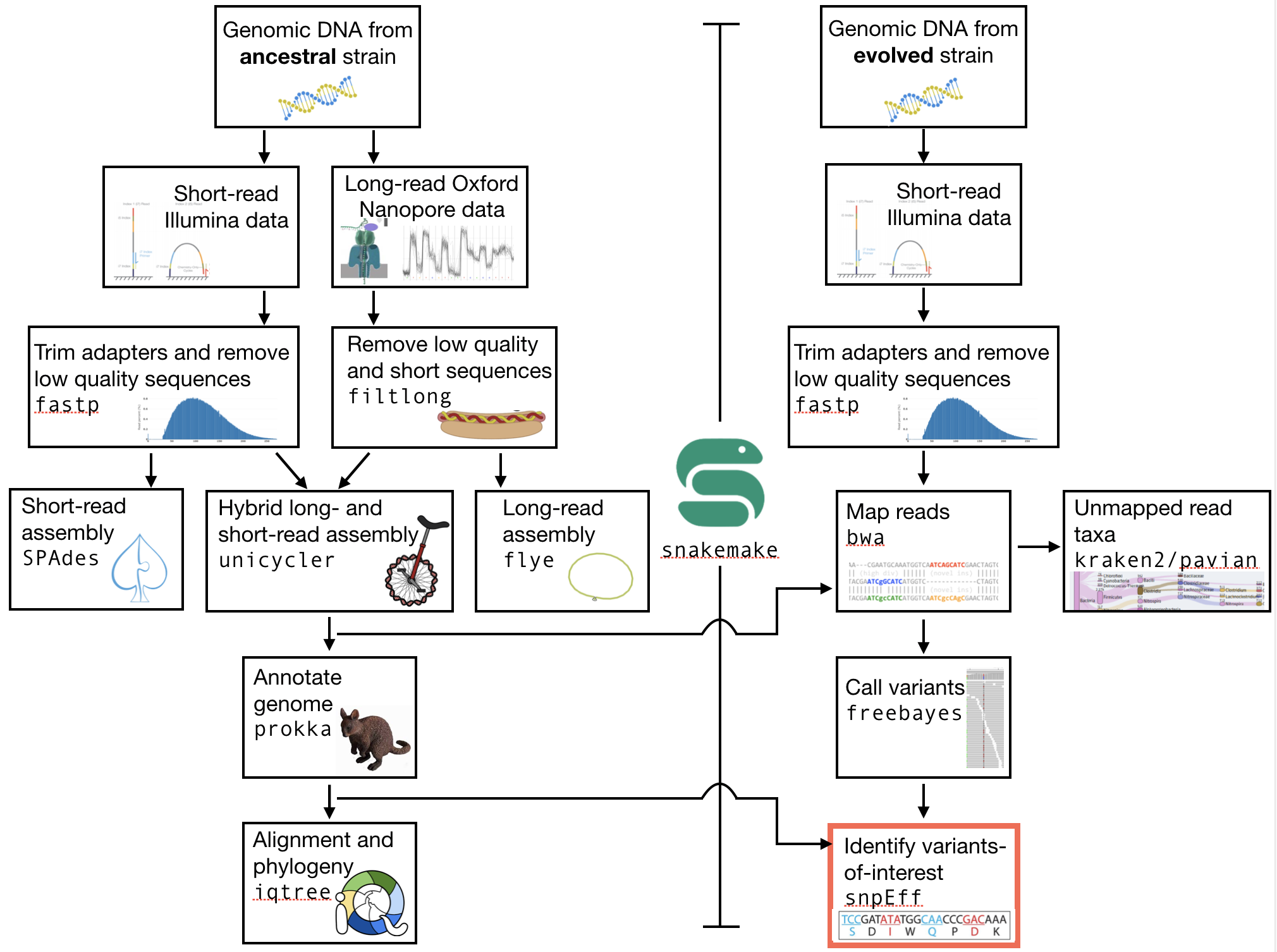
Fig. 11.1 The part of the workflow we will work on in this section marked in red.
11.3. Learning outcomes
After studying this section of the tutorial you should be able to:
Identify variants of interests.
Understand how the variants might affect the observed biology in the evolved line.
11.4. General comments for identifying variants-of-interest
Things to consider when looking for variants-of-interest:
The quality score of the variant call.
Do we call the variant with a higher then normal score?
The mapping quality score.
How confident are we that the reads were mapped at the position correctly?
The location of the SNP.
Does the SNP overlap a coding region in the genome annotation?
The type of SNP.
substitutions vs. indels (indels are common and often wrong for Nanopore assemblies).
Consider all of these factors and then construct some hypotheses about why you observe the change(s) you do (Fig. 11.2)

Fig. 11.2 Your hypotheses.
11.5. SnpEff
We will be using SnpEff to annotate our identified variants. The tool will tell us which mutations might warrant further analyses.
11.5.1. Installing software
Tools we are going to use in this section and how to install them if you not have done it yet.
# activate the env
conda activate ngs

# Install these tools into the conda environment
# if not already installed
conda install snpeff
install -c bioconda snpsift
conda install genometools-genometools
Make a directory if you like (e.g. before you integrate these steps into
your snakemake), and change into
the directory:
mkdir voi

# change into the directory
cd voi
11.5.2. Prepare the SnpEff database
We need to create our own config-file for SnpEff. Where is the snpEff.config:
# look for snpEff.config in the miiniconda directory.
# specify the /share/ subdirectory
find ~/miniconda3/share/ -name snpEff.config
# result should be something like
# myhome/share/snpeff-5.0-1/snpEff.config
This will give you the path to the snpEff.config. It might be looking a bit different then the one shown here, depending on the version of SnpEff that is installed.
- Make a local copy of the
snpEff.configinto your current directory (e.g. the results directory of your annotation) and then edit it with an editor of your choice:
# make sure this path is to *your* snpEff config
# we are copying this so that the path is easy
# to find and that we don't mess up the original
cp myhome/share/snpeff-5.0-1/snpEff.config .
nano snpEff.config
- Make sure the data directory path in the
snpEff.configlooks like this (most likely it does):
data.dir = ./data/
There is a section with databases, which starts like this (around line 130):
#-------------------------------------------------------------------------------
# Databases & Genomes
#
# One entry per genome version.
#
# For genome version 'ZZZ' the entries look like
#   ZZZ.genome              : Real name for ZZZ (e.g. 'Human')
#   ZZZ.reference           : [Optional] Comma separated list of URL to site/s Where information for building ZZZ database was extracted.
#   ZZZ.chrName.codonTable  : [Optional] Define codon table used for chromosome 'chrName' (Default: 'codon.Standard')
#
#-------------------------------------------------------------------------------
Add the following two lines in the database section underneath these header lines:
# my E. coli genome
ecolianc.genome : EcoliAnc
And go ahead and save and close the snpEff.config file.
Now, we need to create a local data folder called ./data/ecolianc (e.g.
in your voi directory).
# create folders
# here -p makes the intermediate directories if needed
mkdir -p ./data/ecolianc
Copy our genome assembly to the newly created data folder.
The name needs to be sequences.fa or ecolianc.fa (not
assembly.fasta). Again here we copy so that it is present in
the ./data/ecolianc directory.
# for exxample
cp assembly.fasta ./data/ecolianc/sequences.fa
Lastly, copy your genome annotation to the data folder.
The name needs to be genes.gff (or genes.gtf for gtf-files),
and should be a result of your prokka analysis.
cp my_prokka_annotation.gff ./data/ecolianc/genes.gff
#gzip ./data/yeastanc/genes.gff
Now you can build a new SnpEff database using the snpEff build command. We need to give
snpEff the .gff file and the directory with the assembly. We will place the output of the command
into a file for later reference (snpEff.stdout). This should take only a few seconds.
snpEff build -c snpEff.config -gff3 -v ecolianc > snpEff.stdout
11.5.3. SNP annotation
Now we can use our new SnpEff database to annotate some variants. To do this we
invoke the snpEff command, tell it the folder that contains the reference, gff, and
a newly created snpEff predictor file, and lastly, give it the current .vcf file. Important:
- use the
ud 0argument to prevent annotation of possible effects on upstream and downstream genes.This means that it will look 0 bp upstream and 0 bp downstream for effects.
For example:
snpEff -ud 0 -c snpEff.config ecolianc my_variant_calls.q220.vcf > my_variant_calls.q220.annotated.vcf
SnpEff adds ANN fields to the vcf-file entries that explain the effect of the variant.
You should annotate both your bamtools and freebayes .vcf fiiles.
11.5.4. Example
Lets look at one entry from the annotated one. We are only interested in the 8th column, which contains information regarding the variant. SnpEff will add fields here:
# my_variant_calls.q225.annotated.vcf
1   3593830 .   C   T   563.058 .   AB=0;ABP=0;AC=2;AF=1;AN=2;AO=26;CIGAR=1X;DP=27;DPB=27;DPRA=0;EPP=19.3799;EPPR=0;GTI=0;LEN=1;MEANALT=2;MQM=31.0769;MQMR=0;NS=1;NUMALT=1;ODDS=40.6488;PAIRED=1;PAIREDR=0;PAO=0;PQA=0;PQR=0;PRO=0;QA=862;QR=0;RO=0;RPL=5;RPP=24.391;RPPR=0;RPR=21;RUN=1;SAF=21;SAP=24.391;SAR=5;SRF=0;SRP=0;SRR=0;TYPE=snp;ANN=T|missense_variant|MODERATE|HCBPOPCK_03471|GENE_HCBPOPCK_03471|transcript|TRANSCRIPT_HCBPOPCK_03471|protein_coding|1/1|c.970G>A|p.Ala324Thr|970/3498|970/3498|324/1165||,T|intragenic_variant|MODIFIER|HCBPOPCK_00086|null|gene_variant|null|||n.3593830C>T||||||   GT:DP:RO:QR:AO:QA:GL    1/1:27:0:0:26:862:-64.7878,-7.82678,0
Wow.
SnpEff added annotation information starting with ANN=T|missense_variant|....
If we look a bit more closely we find that the variant results in a amino acid change
from an alanine to a threonine (Ala324Thr). In addition, snpEff views this as a
change with a
MODERATEeffect, and tells you that it occurred in the geneHCBPOPCK_03471.
11.5.5. False positives
There are frequently false positive variants identified when dealing with
hybrid assemblies (like unicycler). In our experience, we find those are
often indels. For this reason, it might be useful to screen out variants that
are indels, or to select only variants that are SNPs (e.g. mutations from C to T).
Using the command line program grep, it is simple to identify those variants, for example:
# grep finds lines in a file that match specific pattern of text
# here we look for lines that match "TYPE=snp"
# note that "TYPE=snp" is only a field present in your freebayes variant calls
# the syntax of grep is "grep mypattern myfile.txt"
grep 'TYPE=snp' my_variant_calls.q220.annotated.vcf
You could also look for variants that satisfy two conditions, for example, that are both SNPs AND which cause missense mutations (rather than synonymous mutations):
# here we look for lines that match "TYPE=snp" AND
# "missense_variant"
# the .* in the middle acts as a wildcard
grep 'TYPE=snp.*missense_variant' my_variant_calls.q220.annotated.vcf
In both cases above you can redirect the output to a file using >.
11.5.6. From variants-of-interest to genes-of-interest
Unfortunately, snpEff, while it gives you a lot of information on the type,
effect, and effect size of your mutation,
it does not give you a nice name for the gene in which the mutation occurred
(see above, HCBPOPCK_03471). To find the name, you
can either turn to your genome browser (IGV, see the Genome annotation section), or you can
look at the .tsv file produced by prokka.
- Again, here we can exploit
grepto find the gene in which the variant-of-interest has occurred. For example, if you are interested in
HCBPOPCK_03471, you can find the gene usinggrep HCBPOPCK_03471 my_prokka_annotation.tsv. This should give you a line similar to the following:
# here we are unlucky and find only a hypothetical protein
grep HCBPOPCK_03471 my_prokka_annotation.tsv
 > HCBPOPCK_03471  CDS hypothetical protein

 # let's try something else
 grep HCBPOPCK_00056 PROKKA_04222021.tsv
 HCBPOPCK_00056 CDS era_1   GTPase Era
In this way, you can select variants that appear in genes that might look to be of interest. For example, you can now ask what era does in E. coli. One good place to begin is the EcoCyc website.
Try going there and searchiing for your gene (e.g. era) .